
Features
Six supporting capabilities
Around the core of planning a track and handing it to Suno, AIMusicMaker does the rest of the record: it writes with you, draws the cover, plays the takes back and files them where they belong.
| # | Capability | Role | Workflow step |
|---|---|---|---|
| 01 | Guided AI interviews for artist, album and track planning | A conversation that works out the sound, the record and the songs, then writes the style, prompts and lyrics from your answers. | 1. Artist, 2. Album, 3. Track |
| 02 | Reusable creative skills | The briefs the app works from: how it interviews, how it writes a Suno prompt, what a cover should look like. Edit them or write your own. | 1. Artist, 2. Album, 3. Track |
| 03 | Album artwork | A cover generated from the album's description and style, or dropped in from a file you already have. | 2. Album |
| 04 | Queue and now-playing surfaces | Play a track, an album, an artist or everything, and listen back to takes without leaving the app. | 5. Takes, 6. Definitive take |
| 05 | Connected AI services and MCP access | Claude, ChatGPT, Gemini, Antigravity or Grok by signed-in CLI or API key, and the whole app offered as tools to AI assistants over MCP. | 1. Artist, 2. Album, 3. Track |
| 06 | Local library organization | Audio filed in your music folder as Artist/Album/01 Track.mp3, where any music player will find it. | 5. Takes, 6. Definitive take |
- 01
Guided AI interviews for artist, album and track planning
A conversation that works out the sound, the record and the songs, then writes the style, prompts and lyrics from your answers.
The artist interview asks what the music is: instruments, vocal, tempo, production. It settles on a name, gathers YouTube references and writes the base style.
The album interview covers what is different about this record, what to call it and what the cover should look like. Only the name is required.
The track interview writes titles, Suno style prompts, lyrics and target lengths, several at a time, briefed with the artist's and album's style and the tracks already on the record.
In the app: + Artist in the library, Create an album on an artist, and Write more tracks on an album
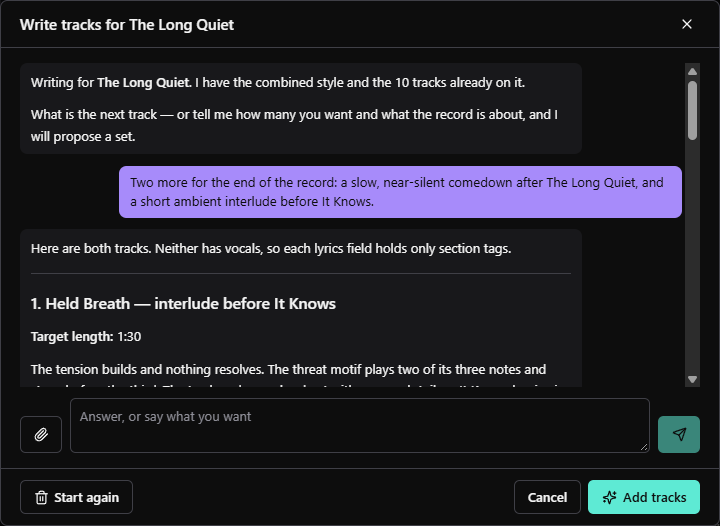
A track interview - The interview opens already briefed: the combined style of the artist and album, and the 10 tracks on the record.
- Your answer. Here: two more tracks for the end of the record.
- It proposes the tracks, each with a title, a target length, a Suno style prompt and lyrics.
- Add tracks reads the conversation and puts the tracks on the album. Start again clears it.
- 02
Reusable creative skills
The briefs the app works from: how it interviews, how it writes a Suno prompt, what a cover should look like. Edit them or write your own.
Each skill is what the app tells a model to do. Edit one and the next interview follows the edit.
The built-in application skills can be edited and reset to how they shipped. Your own sit beside them.
In the app: Skills, at the foot of the sidebar
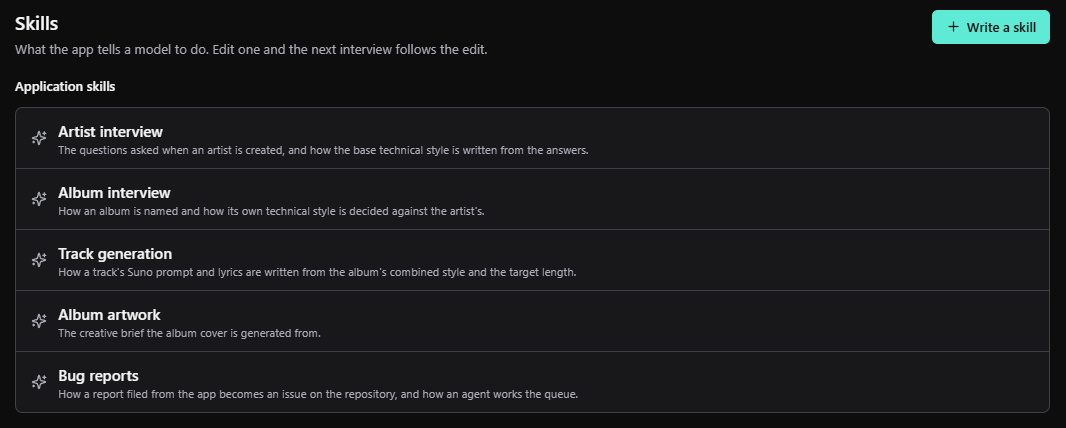
Skills - Skills: what the app tells a model to do. Edit one and the next interview follows the edit.
- Write a skill adds one of your own beside the built-in ones.
- The artist interview's brief: the questions it asks, and how it writes the base style from the answers.
- Track generation: how a track's Suno prompt and lyrics are written. Open any skill to edit it, or reset a built-in one to how it shipped.
- 03
Album artwork
A cover generated from the album's description and style, or dropped in from a file you already have.
Generate draws a cover from what the album interview said it should look like. Covers are made with ChatGPT, through the codex CLI or an OpenAI API key.
Redraw takes a note of what to change, such as "Colder, less busy", and keeps the rest of the cover.
Or use an image file you already have. The cover is kept with the album in your library.
In the app: The cover beside the track list on every album
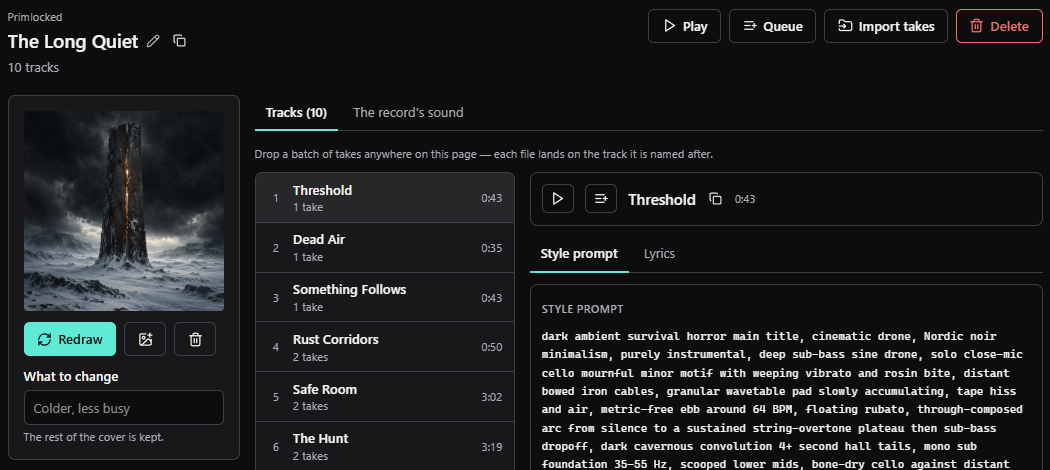
Album artwork - The album's cover, generated from what the album interview said it should look like.
- Redraw makes a new one. Before there is a cover, this button reads Generate.
- Use an image file instead, if you already have the artwork.
- What to change: a note for the next redraw. The rest of the cover is kept.
- 04
Queue and now-playing surfaces
Play a track, an album, an artist or everything, and listen back to takes without leaving the app.
Play and Queue sit on every artist, album and track, so comparing the takes that came back from Suno is a matter of listening through them.
The player bar at the foot of the window carries on as you move around the library. It opens the queue, with repeat, and a Now Playing page.
In the app: Play and Queue on any artist, album or track, and the player bar
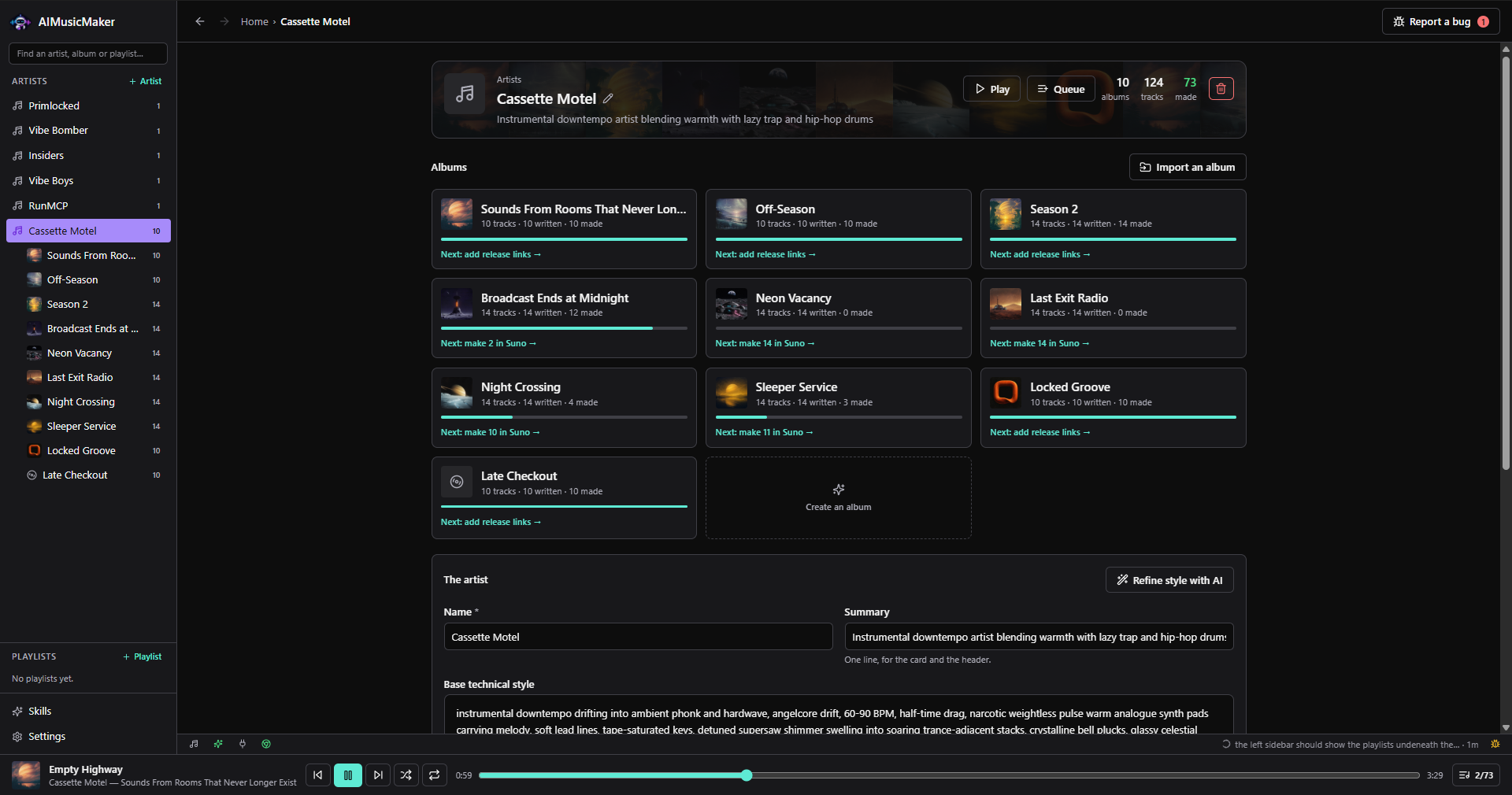
Play, Queue and the player bar - Play and Queue, here on an artist. Albums and tracks have them too.
- The player bar stays at the foot of the window as you move around the library. Here it is playing Empty Highway from Sounds From Rooms That Never Longer Exist.
- Previous, pause, next, shuffle and repeat, with the track's progress.
- Opens the queue: track 2 of 73.
- 05
Connected AI services and MCP access
Claude, ChatGPT, Gemini, Antigravity or Grok by signed-in CLI or API key, and the whole app offered as tools to AI assistants over MCP.
Connect a provider by its signed-in command-line tool, which bills your subscription, or by an API key, which bills the console account. Keys are checked with the provider before they are saved.
Star the one the interviews use.
Under AI assistants, one click registers AIMusicMaker as an MCP server with each supported client.
In the app: Settings, then AI
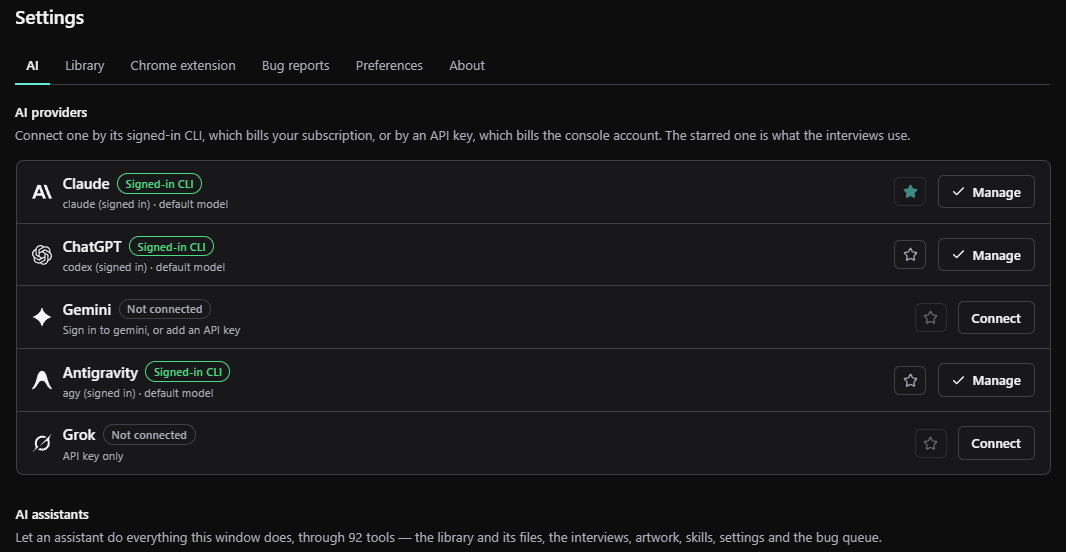
Settings, AI - Claude, connected by its signed-in command-line tool, which bills your subscription.
- The star marks the provider the interviews use. Claude is starred here.
- Connect a provider by its signed-in CLI or an API key. Keys are checked with the provider before they are saved.
- AI assistants, further down: one click registers AIMusicMaker as an MCP server with each supported client.
- 06
Local library organization
Audio filed in your music folder as Artist/Album/01 Track.mp3, where any music player will find it.
Imported takes are copied into your music folder under AIMusicMaker, named after their artist, album and track number. WAVs become 320 kbps MP3s when ffmpeg is installed.
The folder is outside the app's own, so your songs outlive an uninstall. Point it elsewhere in Settings, then Library, which also holds the default target length for new tracks.
In the app: Settings, then Library
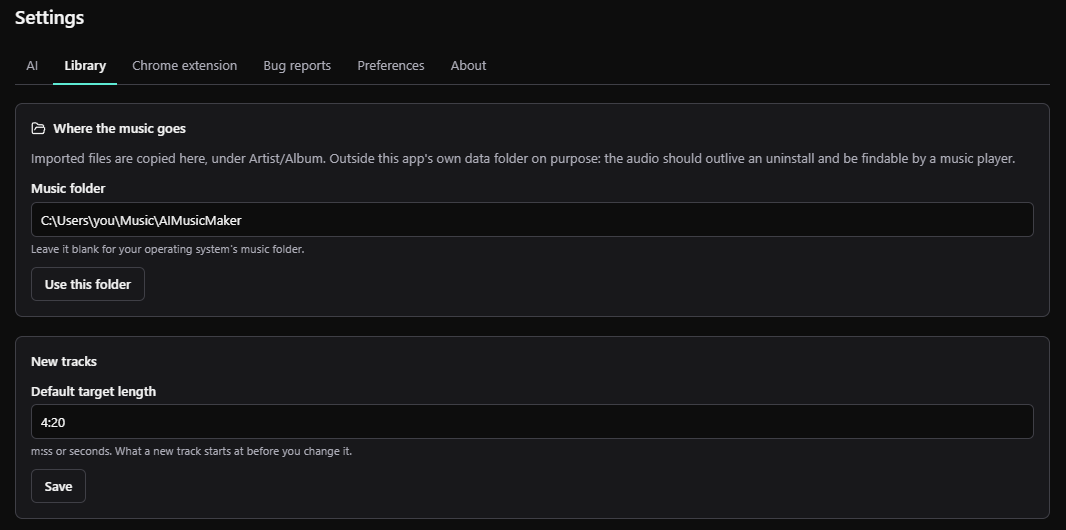
Settings, Library - Imported takes are copied here, under Artist/Album, outside the app's own data folder so they outlive an uninstall.
- The music folder. Leave it blank for your operating system's music folder.
- Use this folder saves a new location.
- The length a new track starts at, until you change it.
MCP
Available to your AI assistant
AIMusicMaker is an MCP server. Connect it from Settings, then AI, and Claude Code, Claude Desktop, Codex, Gemini CLI, Antigravity or Grok can work with your library through 85 tools: planning artists, albums and tracks, filing takes, making covers, running the interviews and working the bug queue. It runs on your machine over stdio, with no token and no port, and works whether or not the app window is open.